
Overview
The digital library service model developed for the MoA II Testbed Project has three layers: services, tools, and digital library objects (fig. 1). In this model, services are provided through tools that discover, display, navigate, and manipulate digital objects from distributed repositories.
This report also proposes a digital object model that fits within the service model. The object model defines digital objects, which are the foundation of the service model, as an encapsulation of content, metadata, and methods.
Each of the layers in the model may be described as follows.
Services Layer
This layer describes the services to be provided for a specific group of users. Because the MoA II Testbed Project relates to scholars’ use of archival materials, these services could include the discovery, display, navigation, and manipulation of digital surrogates made from these collections. The specific service model used in this project follows the standard archival model; that is, materials can be discovered via USMARC collection-level records in a catalog. The catalog records can link the user to the related finding aid that describes the collection in more detail, and the finding aids can link to individual digitized archival materials.
The services layer contains a suite of tools to support the needs of a particular group of users. For example, scholars would be comfortable using sophisticated electronic finding aids to locate and view digital archival materials such as photographs or diaries. However, fifth-graders, with less rigorous information needs, may require simpler tools to discover and view these items.
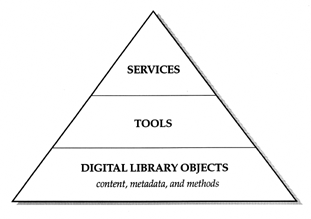
Fig. 1. Digital library service model
Tools Layer
This layer contains the tools that serve the user. The MoA II tools consist of the following:
- an online catalog for the discovery and display of the USMARC collection-level records;
- a standard generalized markup language (SGML)-compliant database that will be used to search, display, and navigate the EAD-compliant electronic finding aids; and
- tools to display and navigate the MoA II-compliant digital archival objects. (Objects are MoA II-compliant when they can be delivered using the proposed encoding standards described later in this paper.)
Any tool is actually a suite of behaviors, or actions. With a digital diary, for example, such behaviors could include actions such as “Turn to the next page,” “Go to the previous page,” “Jump to Chapter 3,” or “Translate this page into French.”
Digital Library Objects Layer
This layer contains the actual digital objects that populate distributed network repositories. Objects of the same class share encoding standards that encapsulate (that is, include) their content, metadata, and methods. Separate classes of digital objects could be defined for books, continuous-tone photographs, diaries, and other objects.
A Model for Digital Library Objects
Digital library objects form the foundation of the digital library service model. It is now possible to create a digital object model for these objects that will fit within the overall service model.
Adding Classes and Content to the MoA II Object Model
The MoA II object model defines classes of digital archival objects (for example, diaries, journals, photographs, and correspondence). Each object in a given class has content that is a digital representation of a particular item. The content can be digitized page images, ASCII text, numeric data sets, and other formats. The following are examples of three classes of archival objects and their content format:
- a photograph made up of a single digitized tagged image file format (TIFF) image
- a photo album made up of 30 photograph objects
- a diary made up of 200 digitized TIFF page images and textual transcriptions
The object model starts by defining classes of archival objects in a system under which each object has content that is an electronic representation of a particular archival item of that class.
Adding Metadata to the MoA II Object Model
For the purposes of this discussion, metadata are considered as separate from content. Metadata are data that in some manner describe the content. The DLF systems architecture committee has identified three types of metadata:
- Descriptive metadata are used in the discovery and identification of an object. Examples include MARC and Dublin Core records.
- Structural metadata are used to display and navigate a particular object for a user. They include information on the internal organization of an object.1 For example, a given diary has three volumes. Volume I has two sections: dated entries and accounts. The dated entries section has 200 entries; entry 20 is dated August 4, 1890, and starts on page 50 of Volume I.
- Administrative metadata represent the management information for the object, including the date it was created, its content file format, and rights information.
Metadata can now be added to the model. Any class of archival object encapsulates both content and metadata, where the metadata are used to discover, display, navigate, manipulate, and learn more about a particular object’s management information.
The distinction among the three types of metadata is not absolute. For example, chapters are part of the structure of a book, but chapter headings may be indexed to aid in the discovery of the item, thus filling one of the roles of descriptive metadata. In fact, the text of a book itself could be indexed and used for discovery.
Adding Methods to the MoA II Object Model
Several concepts used in this paper, including methods, originate from object-oriented design (OOD).
Object-Oriented Design as Part of the Object Model
The popularity of OOD is evident in the widespread use of related programming languages such as C++ and Java. Some of the reasons for this popularity also make OOD an attractive addition to the digital library service model. In particular, OOD actually models users’ behaviors, making it easier to more accurately translate their needs into system applications. This advantage will be discussed in more detail later.
Object-oriented design has another important advantage. In OOD, a digital object conceptually encapsulatesboth content and methods. Methods are program code segments that allow an object to perform services for tools. These methods are part of the object and can be used by developers to interact with the content. For example, a developer can ask a digital book object named Book1 for page 25 by executing that object’s get_page() method and specifying page 25. This method call may look something like Book1.get_page(25).
The most important advantage of making methods part of the object may be that these basic program segments do not then have to be reinvented by every developer.2 Instead, the developer can have the tool ask the object’s existing method to perform the needed work. This makes the development of new tools faster and easier. Since tools directly support the end user in this model, their development should be encouraged.
Defining the Difference between Behaviors and Methods
One great advantage of the object-oriented design approach is that it models users’ behavior with methods. There is a clear distinction between user-level behaviors and methods. The word behaviors relates to how users describe what tools can do for them. For example, “Zoom in on this area of a photograph,” “Show me this diary,” “Display the next page of this book,” or “Translate this page into French.” The word methods refers to how system designers describe what tools can do for a user.
One important reason for distinguishing between behaviors and methods is to establish a process that will enable libraries to engage their users in a dialogue about what services and tools they require, down to the behaviors they need in each tool. Software engineers can then map the user behaviors into sets of methods that are required to perform the necessary functions. The line between behaviors and methods represents the transition from user requirements to system design.
The following examples of user-level behaviors might be relevant an to item in the digital library class “diary”:
- “Show me the organization of this diary.” (It may have three volumes, each of which includes sections on dated entries, accounts, and quotes.)
- “Show me the first page of Volume 1.”
- “Show me page 3, the next page, or the previous page.”
- “Show me the fourth journal entry.”
- “Show me the first entry for August 1890.”
- “Show me more entries on the same topic.”
- “Show me entries that are separated by gaps of more than 10 days.”
- “Show me entries that have these words in them.”
- “Bookmark this entry.”
- “Annotate this entry.”
- “Share these entries with my colleagues.”
In each case, these user-level behaviors would have to be mapped into a series of methods that perform the behavior.
A short example may help illustrate the mapping that occurs between behaviors and methods. Imagine a user-level behavior that is described as “Show me this diary.” The tool executing this request could use object methods to (1) fetch the table of contents and (2) fetch the first page of the diary. The tool would then use its own methods to display the table in one browser frame and the first page in another frame.
Methods as Part of the MoA II Digital Object Model
Methods now become part of the object model. At this point, it is important to note the close relationship between methods and metadata. In most cases, the methods require that appropriate metadata be present.3
The MoA II object model includes methods that are conceptually encapsulated, along with content and metadata, within an object of any given class, where the methods are used by tools to retrieve, store, or manipulate that object’s content. Methods often need the object’s metadata to perform their functions.
Building MoA II Archival Objects
The final step in building a digital library object is to encapsulate the methods, metadata, and content (data) into a digital library object.4 The metadata and content must be encoded in a standard manner for objects in a given class. This encoding is required so that the methods defined for each class can work across all objects in that class.
Summary
This report proposes a digital library service model for the MoA II Testbed Project in which services are based on tools that work with the digital objects from distributed repositories. This model recommends that libraries begin by defining the services they need to provide for each audience they support. Next, they must define the tools needed to implement these services. This process should include the identification of user-level behaviors for the tools, that is, what the tools do as required by the users. This report also proposes a digital object model that fits within the overall service model. The object model describes digital objectsthe foundation of the service modelas an encapsulation of content, metadata, and methods. Different classes of objects exist (for example, diary or photograph), and the content of each object may be text, digitized page images, photographs, or another format. The object also contains metadata of three types: (1) descriptive metadata used to discover the object; (2)structural metadatathat define the object’s internal organization and are needed for display and navigation of that object; and (3) administrative metadata that contain management information (such as the date the object was digitized, at what resolution, and who can access it). The digital object definition borrows from the popular OOD model and includes methods as part of the object. Methods are program code segments that allow the object to perform services for tools.
FOOTNOTES
1Structural metadata exist in various levels of complexity. The diary example above represents a rich structure that may be created for an important work and would include a transcription of the digitized handwritten pages. The structure of the diary could be encoded in this transcription, and the structural metadata could be extracted from it. At the other extreme, a diary could exist with only enough structural metadata to turn the pages.
2 This digital object model is only conceptual. Complete objects made up of metadata, data, and methods do not sit in a repository waiting for use. Instead, they are created as needed. That is, the parts of the objects (methods, metadata, and content) are assembled from different areas of persistent store located anywhere on the network. Using the object-oriented model does not require a repository to use specific object technologies such as object-oriented databases. Relational databases, for example, could be used for the persistent storage.
3 The methods that are part of an object tend to be those that are most used across sets of tools. Tools themselves will have methods and therefore will need access to the metadata and content of the objects. Project staff expect that every object will have a base set of methods that can provide the tools with any metadata or content that is required.
4While the content and metadata must be encoded in a standard manner, they do not necessarily have to be stored together nor do the three different types of metadata need to reside together because objects only come into existence as needed. Therefore, the object can be assembled virtually from persistent storage when required.